Document Extraction
The Read File component can delegate file processing to a KARLI document-extraction service, enabling structured extraction from documents and audio using specialized models. Two remote backends are available: karli (the pre-AISL KARLI backend) and aisl (the AI Service Layer gateway).
Extraction Backend
The component's Extraction Backend dropdown selects how files are processed:
| Backend | Behavior |
|---|---|
docling (default) |
Files are processed locally using the upstream Langflow / Docling pipeline. |
karli |
Files are sent to the KARLI extraction service, which returns structured content. |
aisl |
Files are extracted by the KARLI (AISL) gateway as an asynchronous job. Requires object storage — see below. |
Model Selection
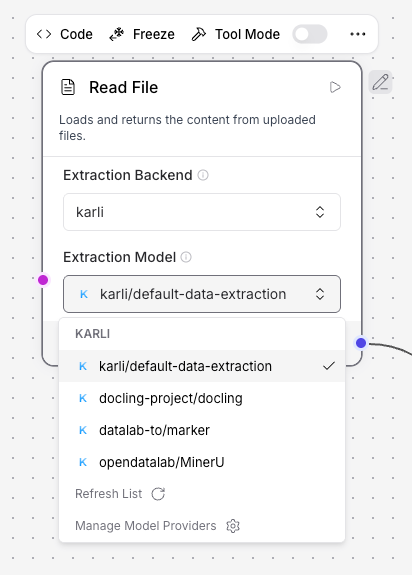
When Extraction Backend is set to karli, an additional Model field appears. The dropdown is populated dynamically from the KARLI provider — KARLI is currently the only provider that offers data-extraction models.
See Models → Data Extraction for the full list of available models and the file types each one accepts. The component validates the uploaded file against the chosen model's accepted type before uploading (for example, submitting a PDF to the Whisper model produces an error rather than an upload).
Authentication
When the karli backend is selected, extraction requests authenticate using the following priority:
- JWT (if a Karli Studio session is active) — sent as
Authorization: Bearer <token>. KARLI_API_KEY(from the component attribute, provider variables, or theKARLI_API_KEYenvironment variable) — sent asX-API-Key: <key>.- Error — if neither is available, a
ValueErroris raised instructing the user to configureKARLI_API_KEYor access via Karli Studio.
Info
KARLI_API_KEY is only relevant when accessing Agentlab directly via the API without a Karli Studio session. Studio users do not need to configure it. See the Model Providers overview for credential details.
How It Works
When extraction is enabled, the component submits the file as an asynchronous task with a multipart POST to {KARLI_BASE_URL}/data-extraction/submit. The form field extractorModel carries the selected model (mapped to its KARLI identifier), and the file part carries the document. The component then follows the task until it finishes; with karli/data-extraction-moe-latest it reports the progress along the way (see Progress reporting). The finished task returns a JSON result whose segments are concatenated into a single text payload — segments with a title are emitted as ## <title> Markdown headers.
flowchart LR
    Upload["File Upload"] --> RF["Read File"]
    RF --> KES["KARLI Extraction Service"]
    KES --> Out["Structured Output"]
The downstream output is a Data carrying:
| Field | Description |
|---|---|
file_path |
Original local path of the uploaded file. |
exported_content |
The assembled text (with ## <title> headers per segment). |
export_format |
Always KARLI for this backend. |
task_id |
The KARLI extraction task identifier — useful for tracing. |
model |
The model identifier that was used. |
Configuration Summary
| Setting | Description |
|---|---|
| Extraction Backend | docling (local), karli (KARLI service) or aisl (AI Service Layer). |
| Model | Visible only when the karli or aisl backend is selected. |
KARLI (AISL) Backend
The aisl backend routes extraction through the KARLI (AISL) provider's AI Service Layer gateway. Like KARLI, it runs extraction as an asynchronous job, but the available services are discovered at runtime instead of being hardcoded.
Model Selection
With aisl selected, the Model dropdown lists the gateway's docparse services, read live from {AISL_BASE_URL}/api/v1/services?type=docparse. New services appear as soon as the gateway advertises them — no Agentlab update needed. If the gateway is unreachable, a small bundled fallback list is shown instead.
Unlike the karli backend there is no model-name translation table: the service id is the model name, and it is what the process endpoint is addressed with.
Object storage requirement
Requires LANGFLOW_STORAGE_TYPE=s3
The docparse API fetches the document itself from an input_url rather than accepting an upload. Agentlab supplies a presigned URL valid for 15 minutes, which only object storage can produce. On instances using local file storage the component fails with a message naming this setting — use the docling backend or the karli provider there instead.
Authentication
Same precedence as the karli backend, but with a single credential and a bearer token throughout:
- JWT (if a Karli Studio session is active) — sent as
Authorization: Bearer <token>. AISL_API_KEY(from the component attribute, provider variables, or the environment variable) — sent asAuthorization: Bearer <key>.- Error — if neither is available, extraction fails with a message naming
AISL_API_KEY.
How It Works
flowchart LR
    Upload["File Upload"] --> RF["Read File"]
    RF --> S3["Object storage
(presigned URL)"]
    RF --> Submit["POST /api/v1/{service}/process/async"]
    Submit --> Poll["GET /api/v1/jobs/{id}"]
    Poll --> Result["GET /api/v1/jobs/{id}/result"]
    S3 -.fetched by.-> Submit
    Result --> Out["Structured Output"]
Agentlab mints a presigned URL for the file, submits the job with output_format: markdown, polls the job until it reaches a terminal state, then fetches and flattens the result. A job that fails or does not finish within 10 minutes surfaces as an error on the component output rather than an exception.
The downstream Data carries the same fields as the karli backend, except:
| Field | Value |
|---|---|
export_format |
KARLI (AISL) |
task_id |
The docparse job id. |
model |
The docparse service id (e.g. docparse-marker). |